The sidebar consists of the following menus:
•Instrument
•Correction
•Measurement
•Analysis
•Utility
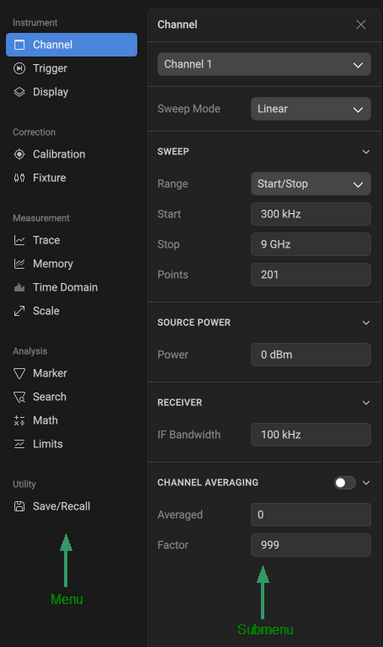
Instrument
Submenu |
Functions |
|---|---|
Channel |
•Set active channel •Set sweep mode •Edit sweep (range, start, stop, and points) •Set source power •Set receiver •Turn ON/OFF channel averaging •Edit channel averaging parameters |
Trigger |
•Select active channel •Edit trigger parameters (mode, control) •Set trigger source •Set trigger scope •Set trigger input (port, event, polarity, position, and delay) •Set trigger output (port, type, function, and polarity) |
Display |
•Set active channel •Add or delete channel •Set active trace •Add or delete trace |
Correction
Submenu |
Functions |
|---|---|
Calibration |
•Select active channel •Open Calibration Wizard •Edit Calibration Kits •Edit Connectors •Edit calibration settings •Edit system impedance |
Fixture |
•Open Fixture Wizard |
Measurement
Submenu |
Functions |
|---|---|
Trace |
•Set active channel and trace •Add or delete trace •Set trace measurement parameters •Set trace smoothing •Set trace hold •Change trace colors |
Memory |
•Set active channel and trace •Add to trace memory or delete from trace memory •Set math operations •Turn ON/OFF memory buffer •Set active memory |
Scale |
•Set active channel and trace •Set scaling •Set electrical delay •Set phase offset |
Analysis
Submenu |
Functions |
|---|---|
Marker |
•Set active channel and trace •Set display settings (active, stimulus, add/delete marker, reference marker ON/OFF) •Set marker properties |
Search |
•Set active channel and trace •Set active marker •Set search parameters •Set search range •Set search properties |
Math |
•Set active trace •Set bandwidth/notch search •Set trace statistics •Set RF filter statistics |
Limits |
•Set active channel and trace •Set limit test parameters •Set ripple limit parameters •Set peak limit parameters |
Utility
Submenu |
Functions |
|---|---|
Save/Recall |
•Access user states •Preset state configuration •Set state configuration start •Save/recall touchstone data |
Settings
Submenu |
Functions |
|---|---|
VNA Devices |
•Disconnect device •Add device •Detected device list •Favorite device list •Demo list |
Appearance |
•Display •Diagram •Panel settings |
Measurement Units |
•Distance units •Temperature •General decimal places •Marker decimal places |
Remote Control |
•Socket server •Port |
